Streamlining processes through enhanced security
The University of South Bohemia in České Budějovice manages more than 15,000 active digital identities. To support this, it uses an IDM solution from Orchitech built on the open-source Wren:IDM platform. Within its complex environment, the university needed a way to streamline and better secure the process of setting and resetting passwords. The answer was to integrate the IDM platform with NIA and Bank iD.
The starting point
A defining feature of the university environment is the large number of new identities added every year. This places significant demands on user account and password management. One of the key challenges was how to deliver temporary passwords to new students securely. The original password management process included several areas that needed improvement:
- Weak temporary passwords — because secure delivery was difficult, passwords were generated from personal data, and students were required to change them at first sign-in.
- A time-consuming process — when a user forgot their password, they had to contact an administrator in person, by phone, or through the Service Desk, and the password then had to be reset manually.
- Limited identity verification — if the user did not appear in person, there was no reliable way to verify their identity.
The solution
After evaluating different options, we chose identity verification through NIA (Czech national electronic identification gateway) and Bank iD (Bank-Verified Identity). The goal was to enable a secure, fully automated process for password setup and reset.
The result was a self-service password reset process verified through NIA or Bank iD, creating a federated environment that connects service providers and relying parties (SP/RP) with identity providers (IdP).
An authentication gateway was integrated into the IDM solution:
- NIA integration uses the SAML 2.0 protocol, with the university IDM platform acting as the Service Provider (SP).
- Bank iD integration uses OpenID Connect, with IDM acting as the Relying Party (RP).
After successful authentication, the requested attributes are passed to IDM, where the user is matched to their identity in the system.
Password reset from the user’s perspective
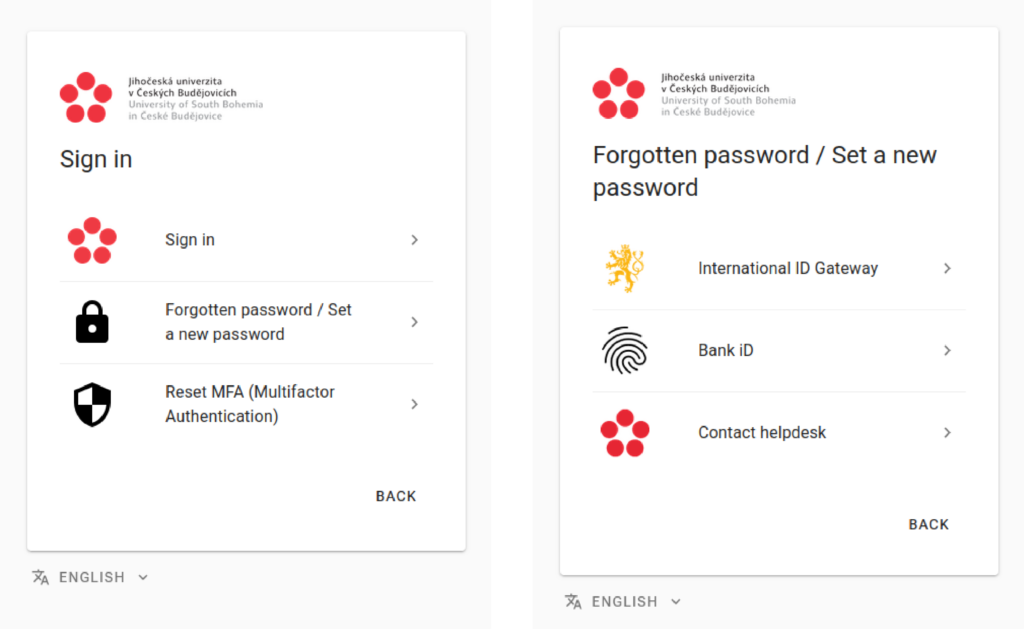
- On the sign-in page, the user selects “Forgotten Password / Set a New Password”.
- They choose a verification method: NIA or Bank iD.
- After successful authentication, they are redirected back to IDM and set a new password.
Benefits for the university
- A significant reduction in administrator workload — only exceptional cases now need to be handled manually.
- Speed and convenience for users — password reset is immediate, available from anywhere, and uses trusted services that users already know.
- Stronger security — guessable passwords derived from personal data were eliminated, while trusted identity verification enabled strong authentication.
By introducing self-service password reset with verification through NIA / Bank iD, the university achieved stronger security, more efficient IT support, and a better user experience.